Bubble Dock: Drag-and-snap puzzle set in a toy harbor
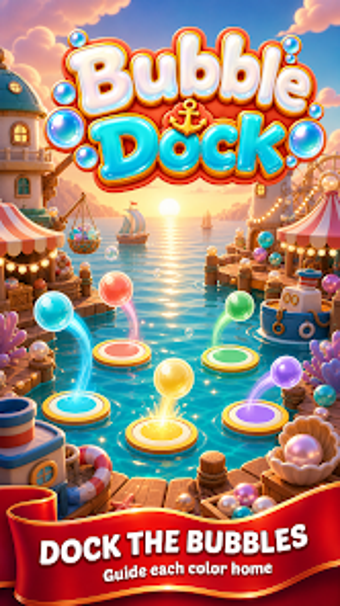
Bubble Dock from SunnyDay Play is a casual puzzle game that places players in a toy harbor to match glossy bubbles to color-coded docks. The main loop uses drag-and-snap touch controls plus a move-counter that forces tactical choices as you race to clear the board. Visual aids include hint arrows and pulse cues, while progressive levels add more colors and complex layouts. The game targets casual Android players who prefer short, strategic play sessions.
Drag-and-snap choices turn every move into a consequence
You enter a playful toy harbor where every swipe matters, because the objective is to snap glossy bubbles into matching docks before your moves run out. So, the game makes planning part of the pleasure: the core loop pairs drag-and-match mechanics with a visible move-counter. Key elements include
- drag-and-snap bubble placement
- color-coded docks as goals
- a limited move budget that ends the round
Early levels teach fast, later stages expand the challenge
The learning curve stays accessible at first, then grows as levels introduce more colors and denser layouts. The progressive design moves from simple three-bubble setups to five-color configurations, which increases planning demands. Hint arrows and a pulse assist feature reduce guesswork on tougher boards. Thus, casual players find a gentle ramp, while completionists encounter more deliberate puzzle construction as they advance.
Graphics and controls favour short, relaxed mobile sessions
The presentation emphasizes glossy, vibrant visuals and touch controls that are easy to learn on Android devices. The studio describes the title as lightweight, with a download footprint around 54–78 MB depending on source, which suits quick sessions on a variety of hardware. Visual aids are integrated into the UI so players can spot options without long menu navigation, supporting pick-up-and-play bursts.
Replay relies on level variety rather than social features
The game's longevity stems from progressive layouts and escalating color mixes rather than competitive or co-op modes; the developer does not list multiplayer functionality. The toy harbor theme gives the match loop a different personality compared with standard bubble-shooter clones, so players who enjoy single-session puzzles and incremental difficulty will return to new board arrangements. Some players seeking social competition may look elsewhere.
A practical casual choice for short, tactical puzzle sessions
The game is a solid choice for casual Android players and fans of color-matching who prefer short, strategic rounds and approachable controls. It is not aimed at those seeking long-term competitive or social play, and its appeal centers on level variety rather than multiplayer engagement. Given its early regional traction, the title suits players who want tidy, session-length puzzles on mobile devices.